Events
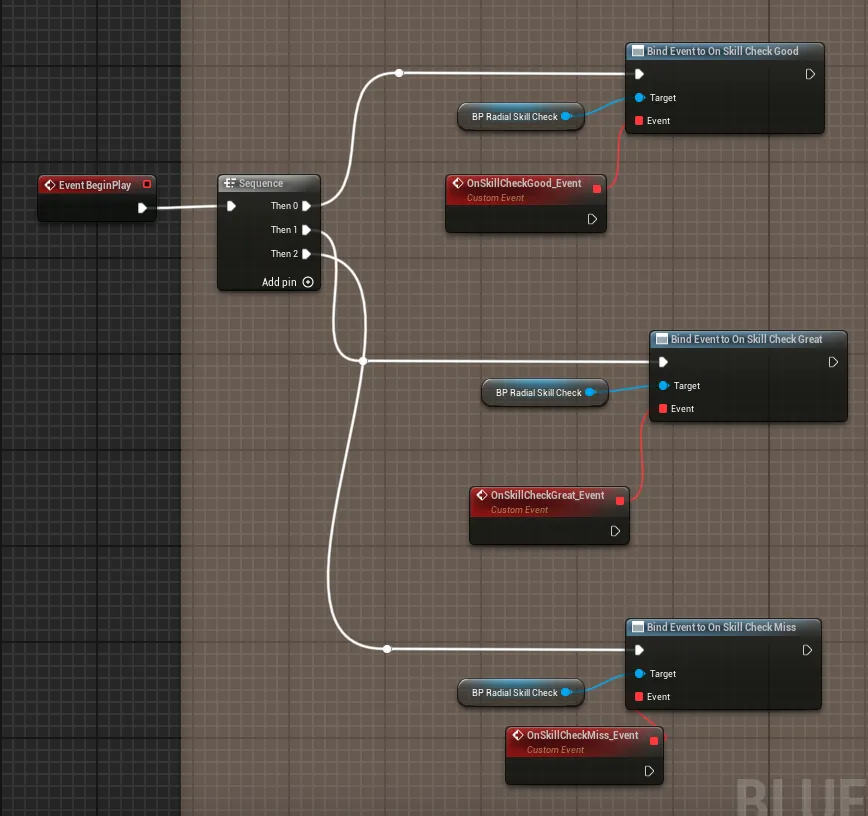
The component reports the result of every check through three Blueprint events. They are all parameterless, so you just bind a handler to each.
| Event | Fires when |
|---|---|
On Skill Check Great | The player stops the gauge inside the great zone. |
On Skill Check Good | The player stops it inside the good zone, but outside the great zone. |
On Skill Check Miss | A wrong stop, or the gauge times out with no input. |
What counts as a miss
Section titled “What counts as a miss”A miss happens two ways:
- Wrong stop: the player calls
Attempt Skill Checkwhile the gauge is outside both zones. - Timeout: the gauge runs out its allowed laps (
Max Full Rotations) with no input. SetMax Full Rotationsto-1to disable timeouts entirely, in which case the only way to fail is a wrong stop.
How a hit is scored
Section titled “How a hit is scored”When Attempt Skill Check fires, the component compares the gauge’s current
angle against the zones in order: the great zone first, then the good
zone, otherwise a miss. Because the great zone sits inside the good zone, a
perfect hit is always also within good range; checking great first is what gives
it priority.
Binding the events
Section titled “Binding the events”Select the component and open Details → Events, then click the + next to each event to add a handler to the Event Graph. You can also drag the component into the graph and pick the red event nodes directly.
Sounds happen on their own
Section titled “Sounds happen on their own”The success and failure sounds set in Gauge Settings play automatically on each outcome, independent of your event bindings, so you get audio feedback even before you wire anything up.
Debugging outcomes
Section titled “Debugging outcomes”Turn on Show Debug Messages on the component to print on-screen messages for session start and end and for each result (great, good, or miss). The component also logs the gauge angle and the resolved zone ranges to the Output Log on every evaluation, which is useful when tuning zone sizes.