Triggering & Flow
The component runs skill checks inside a solving session. This page covers how a session starts and stops, how checks are triggered, and how to vary an individual check.
The solving session
Section titled “The solving session”Begin Solving opens a session; End Solving closes it (removing any visible
gauge and clearing the timers). Checks only happen while a session is open, so
think of the session as the activity the player is busy with (repairing,
lockpicking, casting, and so on).
Automatic vs. manual
Section titled “Automatic vs. manual”Whether checks appear on their own is controlled by Auto Trigger Skill Checks on the component (on by default):
- On: after
Begin Solving, the component shows a gauge everySkill Check Intervalplus or minusSkill Check Interval Varianceseconds (never less than 0.5). After each result it schedules the next, until you callEnd Solving. - Off: nothing appears on its own. Call
Show Gaugeyourself whenever you want a check.
| Property | Default | What it does |
|---|---|---|
Auto Trigger Skill Checks | true | Whether checks appear automatically while solving. |
Skill Check Interval | 3.0 | Base seconds between automatic checks (minimum 0.5). |
Skill Check Interval Variance | 1.5 | Random plus or minus applied to the interval. |
Functions
Section titled “Functions”| Function | What it does |
|---|---|
Begin Solving() | Open a session. Starts automatic checks if enabled. |
End Solving() | Close the session; remove the gauge and clear timers. |
Show Gauge() | Show one check now using Default Gauge Settings. |
Show Gauge With Settings(Settings) | Show one check now using a custom settings struct. |
Attempt Skill Check() | The player’s input: stop the gauge and score it. |
Triggering from outside the character
Section titled “Triggering from outside the character”A common setup is a skill check that belongs to something in the world (a generator, a lock, a chest) rather than to the player, yet still has to react to the player’s key press. This works, because two things are decoupled:
- Where the gauge shows is not tied to where the component lives. The component always draws the gauge on the local player’s screen (it builds the widget for the first player controller), so a Skill Check component sitting on a generator in the level still puts the gauge in front of the player.
- What input must line up with is only the component instance.
Attempt Skill Checkscores whichever component you call it on, so the player’s key has to call it on the exact component that is running the current check.
That leaves two clean patterns.
Pattern A: component on the character, the world object drives it (recommended)
Section titled “Pattern A: component on the character, the world object drives it (recommended)”Keep the Skill Check component on the player character and let the interactable reach in and start the session:
- When the player starts the activity (on interact or overlap), the world object
gets the character’s Skill Check component and calls
Begin Solvingon it (andEnd Solvingwhen the activity ends or the player walks away). - Input never changes. It already lives on the character and already points at that same component, so the key press keeps scoring correctly.
This is the simplest option: the trigger comes from outside, but input “just works” because nothing about the input wiring moved.
Pattern B: component on the world object
Section titled “Pattern B: component on the world object”If you would rather the component live on the generator itself, the trigger is local to that object, but you now have to route input to it:
- When interaction begins, store a reference to that object’s Skill Check
component on the player (for example an
Active Skill Checkvariable on the character or player controller). Set it as the session opens, clear it when solving ends. - Your input action calls
Attempt Skill Checkon that stored reference while it is valid. The gauge still appears on screen because the component targets the first player controller regardless of which actor owns it.
Varying individual checks
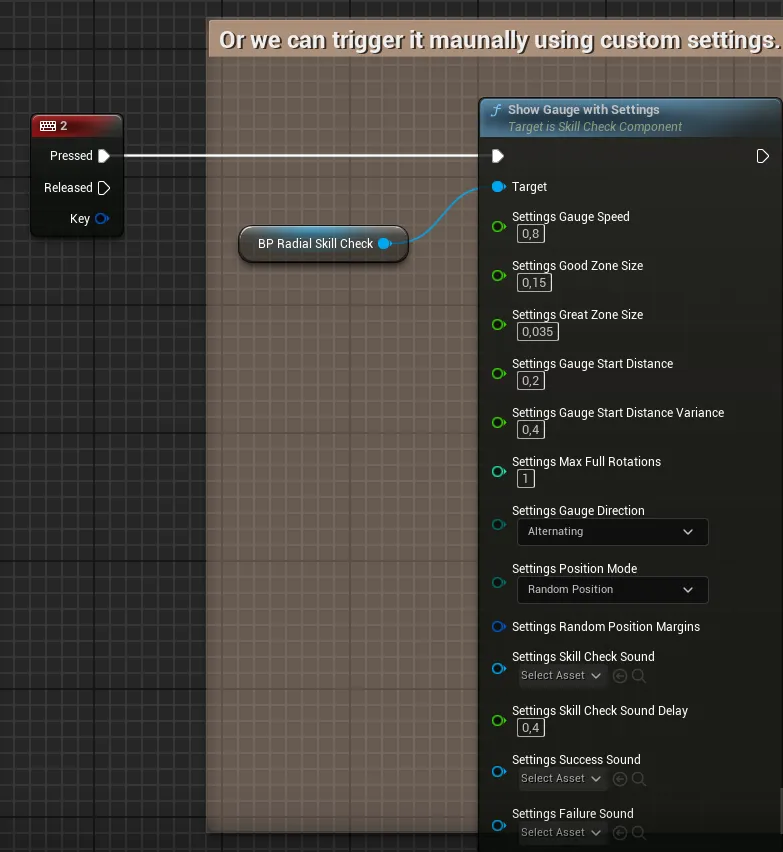
Section titled “Varying individual checks”- One custom check (manual): call
Show Gauge With Settingswith your own struct. Any sound field you leave empty inherits the component’s default sounds, so you only have to fill in what you want to change. - Change every following check: edit
Default Gauge Settingsat runtime (it is Blueprint-writable). Each new check, automatic or manual, copies it as its starting point, so changes apply from the next check onward.
A typical loop
Section titled “A typical loop”Begin Solving // activity starts; auto checks begin ... gauge appears ...Attempt Skill Check // player reacts; result is scored, next is scheduled ... gauge appears ...Attempt Skill CheckEnd Solving // activity ends; everything is cleaned upIn manual mode (Auto Trigger Skill Checks off), replace the automatic
appearances with your own Show Gauge calls, driven by whatever pacing your
gameplay needs.